Guide
How to Write an Invoice (Step by Step, With an Example)
By PDF Invoice Pro · Published

The short answer
To write an invoice, label the document “Invoice”, give it a unique number and the issue and due dates, add your details and your client’s, list each product or service with quantity and price, show the subtotal, tax and total due, then state how and when to pay. Send it as a PDF.
How to write an invoice in 8 steps
- Label it. Put the word “Invoice” at the top so it cannot be mistaken for a quote or a receipt.
- Number it. Use a unique, sequential number such as INV-2026-0042. Never reuse one. The invoice number generator previews a format.
- Date it. Add the invoice date and the due date. On Net 30, an invoice dated 1 March is due on 31 March — the invoice due date calculator handles any term.
- Add your details. Your name or business name, address, email, phone and any tax or VAT number. Add your logo.
- Add the client’s details. Their name or company, billing address and the person who approves payment. Include their purchase order number if they gave you one.
- List the line items. One line per product or service: a clear description, quantity or hours, rate and line total. The invoice description generator suggests wording by trade.
- Show the totals. Subtotal, any discount, tax shown as a separate line with its rate, shipping if any, and the total due in a named currency.
- State how to pay. Payment terms, bank details or a payment link, and any late fee you agreed in advance. Then send it as a PDF.
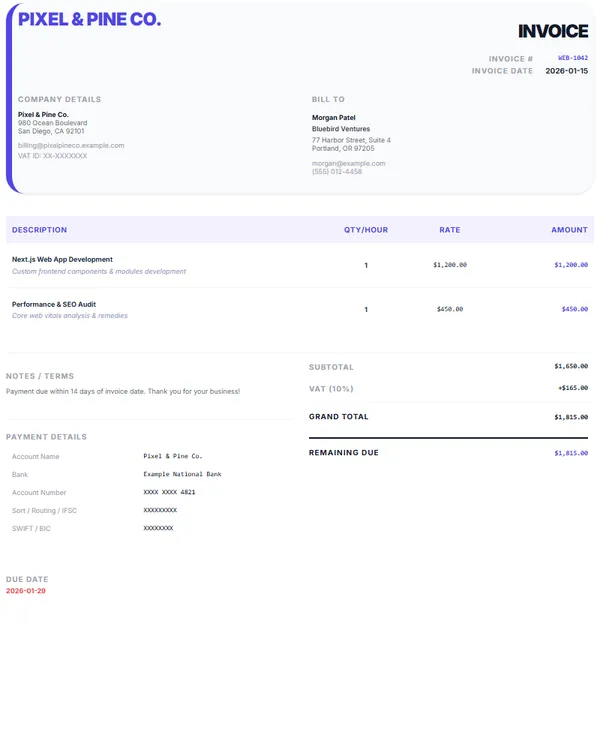
Invoice example
Northwind Studio bills Acme Ltd for a brand project:
| Description | Qty | Rate | Amount |
|---|---|---|---|
| Logo design — 3 concepts, final files | 1 | $1,200.00 | $1,200.00 |
| Brand guidelines document (12 pages) | 1 | $800.00 | $800.00 |
| Revisions — March 2026 | 4 hrs | $75.00 | $300.00 |
| Subtotal | $2,300.00 | ||
| Sales tax (8%) | $184.00 | ||
| Total due by 31 March 2026 | $2,484.00 |
Invoice INV-2026-0042, dated 1 March 2026, Net 30, payable by bank transfer. The descriptions say what was delivered and when, so the client’s accounts team can approve it without a follow-up question.
Mistakes that delay payment
- No due date. “Payable on receipt” is vague; print the actual date as well.
- Vague lines. “Services — $2,300” gets queried. Say what, how much and when.
- Missing purchase order number. Many larger companies cannot pay without it.
- Sending it to the wrong person. Ask who approves invoices before you send the first one.
- Late fees nobody agreed to. Put any late fee in your terms before the work starts; the late fee calculator shows what a rate comes to.
- Editable files. Send a PDF rather than a Word or Excel file so the layout and figures cannot shift.
Writing an invoice with a generator or a template
You can write an invoice in a word processor, but you do the layout and the arithmetic yourself. The free invoice generator has a field for every step above, works out line totals, tax and the total as you type, and downloads a PDF with no sign-up and no watermark.
Prefer a file you can edit offline? Download a free Word invoice template or a Google Sheets invoice template with the totals already set up as formulas.
Rules for what an invoice must show depend on where you trade — in the UK, for example, GOV.UK lists the required details (GOV.UK), and VAT-registered businesses must issue VAT invoices with extra information (HMRC VAT invoices).
Frequently asked questions
What should a good invoice look like?
Clear and consistent: the word “Invoice” at the top, your logo and details, the client’s details, a unique number and dates, an itemised table, totals with tax shown separately, and payment instructions near the total. One page is ideal for most jobs.
What is an invoice number?
A unique reference that identifies one invoice. Most businesses use a sequential series such as INV-0042 so invoices are easy to sort and a missing one is easy to spot.
What is net 30 on an invoice?
A payment term meaning the full amount is due 30 days after the invoice date. An invoice dated 1 March on Net 30 is due on 31 March.
Can I write an invoice if I am not a registered business?
Yes. Freelancers and sole traders can invoice in their own name. Include your name, contact details and any tax number you have, and check the rules where you work.
Should I send an invoice as a PDF or a Word document?
As a PDF. It looks the same on every device and the figures cannot be changed by accident. Keep the editable file for your own records.
Make your invoice now
Free invoice generator: no sign-up, no watermark. Add your logo and tax, then download a PDF.
Open the invoice generatorKeep going


Sources
- Invoices: what they must include — GOV.UK
- VAT invoices — HMRC (GOV.UK)
- Recordkeeping — IRS
General information, not legal, tax or financial advice. Rules differ by country.